An EU-Wallet holder that lives in your browser.
EU ID Wallet software, built in Malta. A hosted, browser-based European Digital Identity Wallet holder for the many Europeans who cannot or will not install a native app: older users, corporate devices without app-install rights, phones already at storage capacity, or people who simply prefer opening a URL. Runs as a Progressive Web App on desktop and mobile, uses WebCrypto for all key operations, backs up an end-to-end encrypted vault to our OIDC server so you can recover on a new device. Made in Malta by Aloaha Limited — a Malta-registered software company shipping self-hostable EU ID Wallet software for EUDIW-conformant issuers and verifiers.
Open the Web Wallet → How to sign in with it →Why a browser wallet at all?
Reach every user
App-install friction is the biggest single reason EU-Wallet uptake will stall. A browser holder reaches the users who never install anything. Same standards, same claims, no store review.
Corporate desktops
Fleet-managed corporate laptops rarely permit app installs. A browser wallet works within the existing browser sandbox and passes standard IT policy.
Instant onboarding
Verifier flow can bootstrap a wallet in the same tab: user has no wallet → click the "Sign in with EU Wallet" button → wallet UI opens → they finish the flow. No app-store detour.
Cross-device by design
Sign in on a new laptop, restore the vault via passkey or passphrase, all your credentials are back. Zero-knowledge backup means Aloaha holds only ciphertext.
How you sign in
The wallet is gated by our own OIDC provider — the same sign-in that protects every other admin surface. There is no separate "wallet account"; there is one identity per tenant. When you open /web-wallet.html you are prompted to sign in (WebAuthn, TOTP, or password, per tenant policy) and every request the wallet makes to /wallet-backup.ashx carries an OIDC bearer token.
Two layers, each doing its own job. Authentication (OIDC, "who are you") gets you access to the encrypted vault blob. Vault decryption (passphrase or WebAuthn passkey PRF, "what unlocks your credentials") is independent of authentication and never leaves your browser. Zero-knowledge is preserved: the server knows who you are but still cannot decrypt your credentials.
Multi-factor recovery (from day one)
Losing your device shouldn't mean losing your credentials. The wallet stores an end-to-end encrypted vault that can be unlocked by any single registered recovery factor.
Factor 1 — Recovery passphrase (mandatory)
PBKDF2-SHA256 with 600 000 iterations (OWASP 2023) derives a key-encryption-key from your passphrase. The passphrase never leaves your browser. Write it down — it is the cold-storage fallback for the worst case.
Factor 2 — WebAuthn passkey (recommended)
Register a passkey with the WebAuthn PRF extension. The PRF derives a deterministic key-encryption-key per authenticator. On modern browsers (Chrome, Edge, Safari 17+, Firefox 122+) the passkey syncs via iCloud Keychain / Google Password Manager / Windows Hello, so a new device recovers your wallet with just the passkey ceremony — no passphrase entry needed.
Factor 3 — Multi-device passkeys (belt-and-braces)
Register additional passkeys on other browsers or devices. Each factor wraps its own copy of the vault's data-encryption-key. Add, remove, or replace factors at any time without re-encrypting the vault.
Zero-knowledge server backup
The wallet syncs its encrypted vault blob to your tenant's /wallet-backup.ashx endpoint (OIDC-bearer gated). Our server stores ciphertext only. We literally cannot decrypt your vault, use your keys, or help you if you lose every recovery factor. That is by design (zero-knowledge) and stated plainly in the setup wizard.
Envelope encryption: a random 256-bit data-encryption-key (DEK) encrypts your credentials with AES-256-GCM. The DEK is wrapped once per registered factor using AES-KW (RFC 3394). Passphrase factor: DEK wrapped under PBKDF2-derived key. Passkey factor: DEK wrapped under an HKDF-SHA256 derivation of the WebAuthn PRF output. Any surviving factor unwraps the DEK and decrypts the vault.
Supply-chain resilience: Aloaha-owned code

The entire EUDI protocol layer — SD-JWT VC parsing, KB-JWT signing, OID4VP presentation, OID4VCI credential import, wallet attestation, WebAuthn PRF integration, envelope encryption — is written line-by-line by Aloaha Limited in Malta. Zero eudi-lib-* dependencies in the tree. Zero openid4vc-* library adapters. Generic infrastructure libraries used elsewhere in the platform are well-established open-source components documented in our SBOM; the EUDI protocol layer is 100% ours.
Why this matters under the Cyber Resilience Act. Regulation 2024/2847 calls SBOM the minimum — “at the very least the top-level dependencies”. The Log4Shell-class of attacks lives in transitive dependencies that a standard SBOM does not surface. Our architectural response was to remove the supply chain for the parts that matter: a Log4Shell in the EUDI stack requires an EUDI supply chain to exploit, and we deliberately do not have one. Machine-readable SBOM: /sbom.spdx.json. Full rationale: cyber-resilience.html § 01.
Share-QR — scan-and-verify without installing a wallet
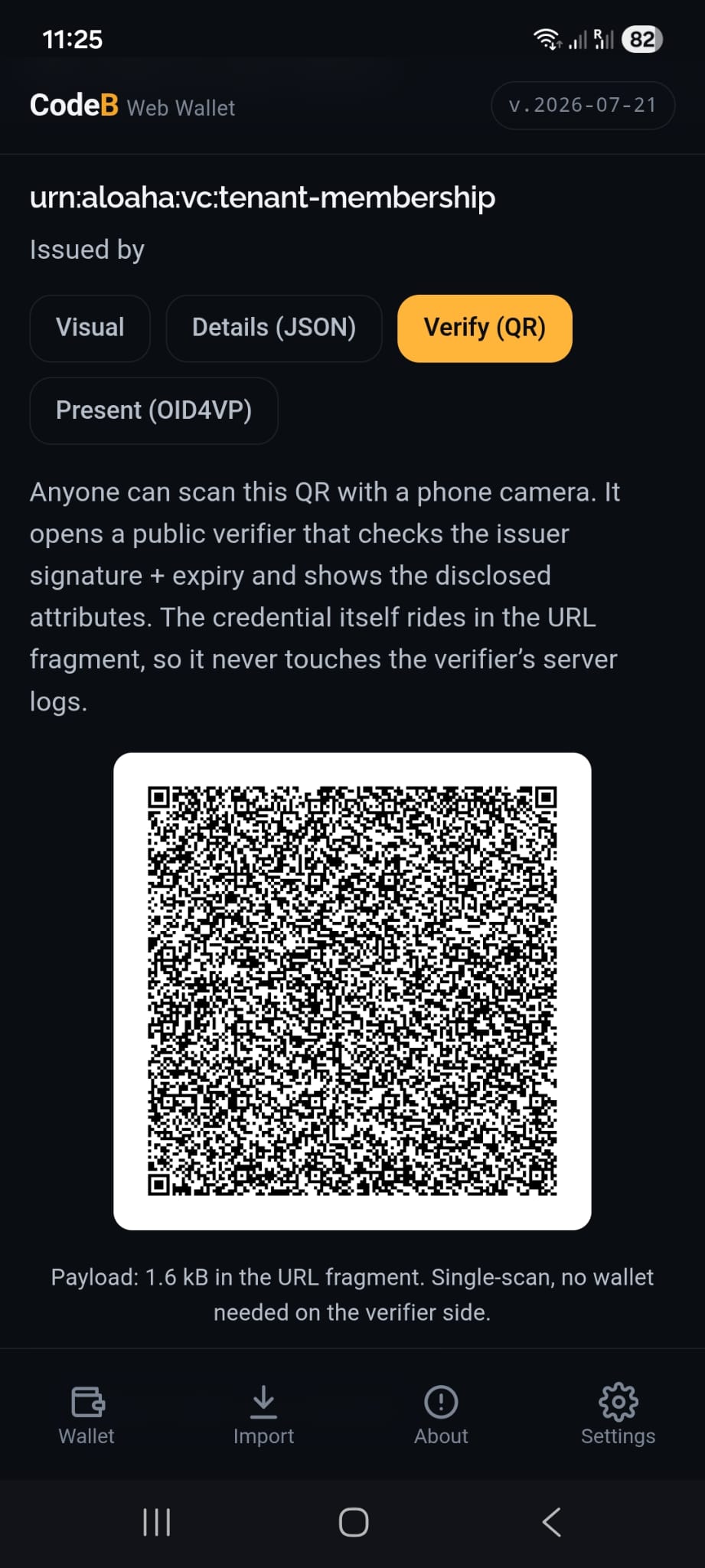
The wallet holder taps Verify (QR) on any credential. The full SD-JWT VC is POSTed to a per-tenant relay /vshare.ashx, which stores it under a 128-bit random opaque id and returns a short link. The QR encodes only that short link (~120 bytes), so it scans reliably from a phone screen across the room. The verifier fetches the credential by id, parses it in the browser, and shows a physical-mimic ID card with the disclosed attributes and a green VALID / red INVALID cryptographic status. Anyone with a phone camera can verify; no wallet app required.
Configurable TTL
1 minute (shop counter, single scan) through 15 minutes (default), 1 hour, 1 day, 7 days, 30 days, 1 year, up to 2 years (public demo QR on LinkedIn / blog / conference badge). Filename-encoded expiry, sweep-on-write, hard clamp at the handler.
Portrait via URL
PID + mDL credentials carry a portrait_url claim covered by the issuer signature. The verifier renders the portrait via <image> pulling directly from the tenant's /portrait.ashx?id=…. Signature covers the URL string, so swapping the URL breaks the credential.
No installed wallet needed
Verifier is a static page with WebCrypto. Fetches issuer JWKS via /.well-known/jwt-vc-issuer. Same page verifies PID, mDL, EHIC, mVRC, and any tenant-defined VCT.
Try it now — scan or click
Two live demo credentials. Scan a QR with your phone camera, or click it if you’re on a laptop. No wallet app required — the verifier opens in your browser and cryptographically checks the SD-JWT VC.
John CITIZEN
EU Digital Identity Wallet — Identity Card (PID)
Instead of scanning you can also click the QR to open the verifier directly.
Erika Mustermann
EU Digital Identity Wallet — Identity Card (PID)
Instead of scanning you can also click the QR to open the verifier directly.
Standards + interoperability
OID4VP 1.0 FINAL
HAIP 1.0 Final mandates x509_hash. x509_san_dns is supported as an additional OpenID4VP compatibility mode for legacy wallets and is not part of HAIP Final. Presentations use JWE ECDH-ES A128GCM/A256GCM envelopes.
OID4VCI
Pre-authorized_code flow with dynamic vct resolution and holder-binding via cnf.jwk.
SD-JWT VC
Draft 07-compliant parsing + selective disclosure + KB-JWT with sd_hash.
W3C VCDM 2.0
JSON credential + @context, JOSE envelope typ=vc+jwt, ES256 signed. Issuer at /vcdm.ashx?action=issue, verifier at ?action=verify. Ships alongside SD-JWT VC.
W3C DID Core 1.0
Tenant publishes did:web:<host> at /.well-known/did.json. Resolver at /did.ashx?did=… handles did:key, did:jwk, did:web, did:webvh with SSRF-guard.
W3C Bitstring Status List v1.0
Compressed gzipped bitstring with multibase-u encoding, published as a signed VC-JWT with 7-day freshness. Bit-flip requires admin bearer.
ETSI TS 119 602/612 Trusted List
Tenant publishes its own LoTE at /.well-known/trust-list.xml, XMLDSig enveloped ECDSA-SHA256, exclusive C14N. Plus a JSON mirror.
HAIP §5.11 Wallet Provider
Metadata JWT at /.well-known/wallet-provider.jwt. Mints WUA (12-month Unit Attestation) + WIA (24-hour Instance Attestation) for attest_jwt_client_auth.
ISO/IEC 18013-7
mDoc online-presentation profile advertised in vp_formats_supported.mso_mdoc.iso18013-7_profile_supported.
WebAuthn Level 3 PRF
Passkey-based key derivation per draft-ietf-webauthn-prf.
WebCrypto only
All crypto via window.crypto.subtle. Non-extractable keys where possible. No JavaScript polyfills.
Same-origin CSP
Wallet page enforces strict CSP so no third-party script can exfiltrate the vault DEK during its brief in-memory window.
How it fits alongside the native EUDI Wallet
When the government-notified EUDI Wallet Instance for a Member State ships, users who want LoA-High and hardware-anchored PID belong there. This browser holder complements it, not competes with it. Use it for the audience the native app doesn't reach: older users, corporate desktops, first-touch onboarding, sector-specific credentials where LoA-Substantial is fit-for-purpose, or as a fallback when the native app isn't installed yet.
Read next
- Verifier live demo (OID4VP 1.0 FINAL)
- HAIP conformance evidence
- Age verification demo
- Verify a wallet credential (Share-QR public verifier) — scan a wallet-holder's Verify-QR from any phone camera; checks signature + expiry + disclosures + status-list bit entirely in the verifier's browser.
- Membership cards cookbook — tenant playbook for issuing member VCs into wallets and verifying them at the door.
- Machine-readable /openapi.json
Frequently asked questions
What is the Aloaha Web Wallet?
The Aloaha Web Wallet is a browser-based, self-hostable European Digital Identity Wallet holder that runs as a Progressive Web App. It receives credentials via OpenID4VCI, presents them via OID4VP, stores them in SD-JWT VC format and uses WebCrypto for all key operations. It is EU ID Wallet software made in Malta by Aloaha Limited.
Is the Aloaha Web Wallet my country's official EUDI Wallet?
No, the Aloaha Web Wallet is not the EUDI Wallet Instance, which is the government-notified native app issued by each Member State. The Aloaha Web Wallet is a companion holder for audiences a native app does not reach, such as older users, managed corporate desktops or first-time onboarding. Users who need LoA High and hardware-anchored PID belong in the national wallet once it ships.
What eIDAS level of assurance does the Aloaha Web Wallet have?
The Aloaha Web Wallet does not claim an eIDAS assurance level. It is designed for use cases targeting Level of Assurance Substantial, subject to deployment configuration and a formal conformity assessment, and Aloaha does not self-assign an assurance level in the absence of that assessment.
Do I need to install an app to use the Aloaha Web Wallet?
No, the Aloaha Web Wallet needs no app-store install and no camera. It opens from a URL in the browser and can be installed as a Progressive Web App on iOS, Android, Windows, macOS and Linux. That makes it usable on fleet-managed corporate laptops that do not permit app installs.
Which standards does the Aloaha Web Wallet support?
The Aloaha Web Wallet implements OID4VP 1.0 Final presentation with x509_hash (as mandated by HAIP 1.0 Final) plus x509_san_dns as a compatibility mode, and OpenID4VCI with the pre-authorized_code flow. Credentials use SD-JWT VC with selective disclosure and KB-JWT, and the stack also supports W3C VCDM 2.0, W3C DID Core 1.0, W3C Bitstring Status List v1.0 and HAIP §5.11 Wallet Attestation. The mDoc online-presentation profile of ISO/IEC 18013-7 is advertised in the verifier metadata.
How do I sign in to the Aloaha Web Wallet?
The Aloaha Web Wallet is gated by the tenant's own OIDC provider, so there is no separate wallet account. When you open /web-wallet.html you sign in with WebAuthn, TOTP or password, depending on tenant policy. Signing in only grants access to the encrypted vault blob; unlocking the credentials is a separate step that happens in your browser.
What happens if I lose the device with my Aloaha Web Wallet?
The Aloaha Web Wallet keeps an end-to-end encrypted vault that any single registered recovery factor can unlock on a new device. A recovery passphrase is mandatory and is stretched with PBKDF2-SHA256 at 600,000 iterations; a WebAuthn passkey with the PRF extension is recommended and can sync via iCloud Keychain, Google Password Manager or Windows Hello. Additional passkeys on other devices can be registered as further factors.
Can Aloaha read the credentials in my Web Wallet?
No, the Aloaha Web Wallet backup is zero-knowledge: the server stores only ciphertext of the vault. Credentials are encrypted with AES-256-GCM under a random data-encryption key that is wrapped per recovery factor, and the passphrase and passkey output never leave your browser. The flip side is that Aloaha cannot help you if you lose every recovery factor.
How can someone verify a credential from the Aloaha Web Wallet without installing a wallet?
The Aloaha Web Wallet has a Share-QR feature: tapping Verify (QR) on a credential stores it on a per-tenant relay under a random id and shows a QR code with a short link. Anyone with a phone camera can scan it; the verifier page checks the SD-JWT VC signature, expiry, disclosures and status in the browser and shows a VALID or INVALID result. The link lifetime is configurable from 1 minute up to 2 years, with 15 minutes as the default.
Can I sign PDFs with the Aloaha Web Wallet?
Yes, the Aloaha Web Wallet can sign PDFs through a Cloud Signature Consortium (CSC) v2 subset. Signatures are PAdES-B-T with an RFC 3161 timestamp, use a per-user EC P-256 certificate enriched from your OIDC profile, and work with encrypted PDFs (RC4-128 and AES-128). These are Advanced Electronic Signatures only, not qualified signatures.
Does the Aloaha Web Wallet use third-party EUDI libraries?
No, the Aloaha Web Wallet's EUDI protocol layer is written by Aloaha Limited in Malta with no eudi-lib-* or openid4vc-* library dependencies. This covers SD-JWT VC parsing, KB-JWT signing, OID4VP presentation, OID4VCI import, wallet attestation, WebAuthn PRF integration and envelope encryption. Generic infrastructure libraries used elsewhere in the platform are listed in the machine-readable SBOM at /sbom.spdx.json.